

/api/v1/spend/** on the Admin API.
Either half runs on its own. APP_MODULES_MONETIZATION_ENABLED=false gives
you internal spend without the billing engine: plans, customers, credits,
invoices, the client API, Stripe and the billing jobs are off, their routes
answer 404 with "code": "module_disabled", and the console opens on
Internal spend. APP_MODULES_BUILD_ENABLED=false is the reverse. Nothing
about the other half needs to be configured first, and flipping the flag
later needs no reinstall.
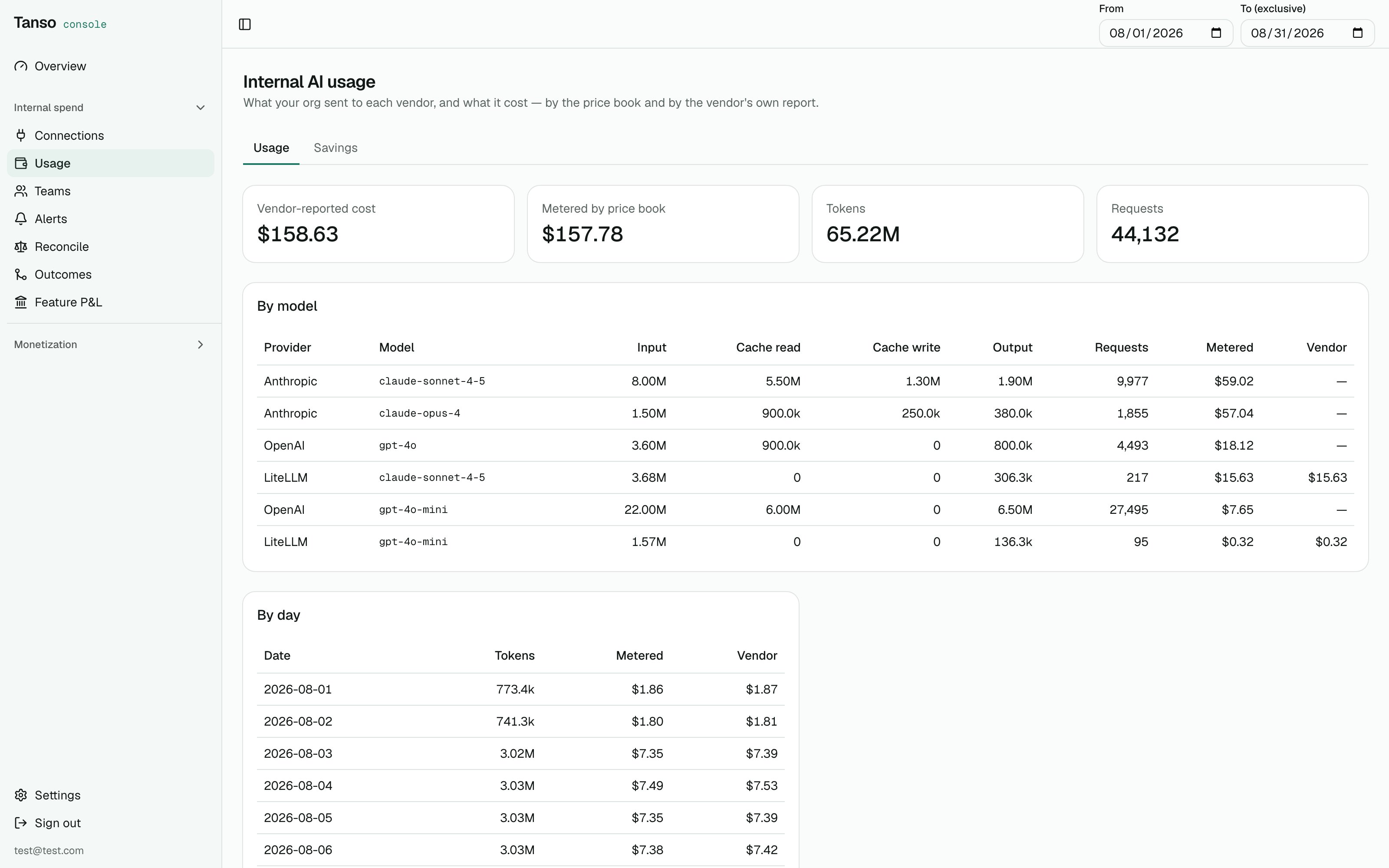
Internal spend → Usage: what your org sent each vendor, priced two ways
1. Connect a vendor
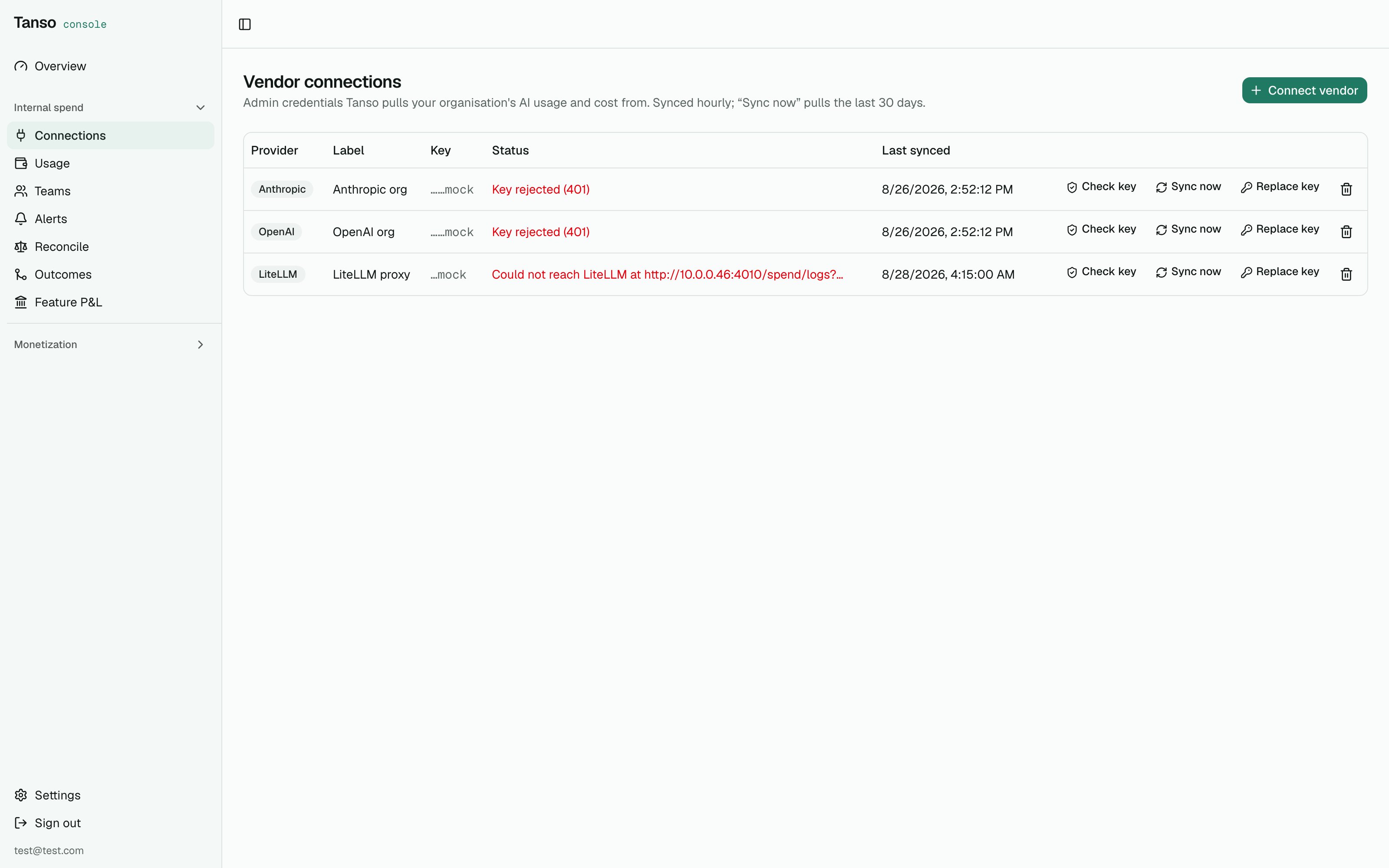
sk-ant-admin01-…, created under Console → Settings → Organization), an
OpenAI admin key, a Cursor admin API key (Enterprise plan), a GitHub token
with the View Organization Copilot Metrics permission plus the org name, or
a LiteLLM proxy’s master key plus the proxy URL. The key is encrypted at rest under APP_SECRETS_KEY and
only its last four characters are ever shown.
- Check key makes one cheap call and records
ACTIVEorERROR(with the vendor’s own message) on the row. - Sync now pulls the last 30 days. After that an hourly job re-pulls the last three days — vendor reports lag by up to an hour, so yesterday is never final on the first pass.
- Replace key swaps a key that stopped working; pulled usage stays.
502 with error.code: "vendor_error" and
the vendor’s message.
What is pulled
Rows land in
vendor_usage_buckets in the vendor’s own dimensions. A window
is deleted and rewritten on every pull, so re-syncing is idempotent.
Per-person data is uneven and Tanso says so rather than guessing: Anthropic
reports people only for Claude Code; OpenAI only for user-scoped keys; Cursor
and Copilot per seat; usage through Bedrock or Vertex is invisible to all of
them. Cursor windows are capped at 30 days by Cursor; a longer sync is pulled
in 30-day chunks.
2. Usage
Internal spend → Usage shows a window by model, by day, and by person, two ways:- Metered — tokens × the price book (
model_pricing, including cache read/write rates). A model the price book does not know prices to zero and is named inunpricedModels; a model without cache rates prices cached tokens at the full input rate and is marked~cache. - Vendor — what the vendor’s own cost report says.
3. Reconcile
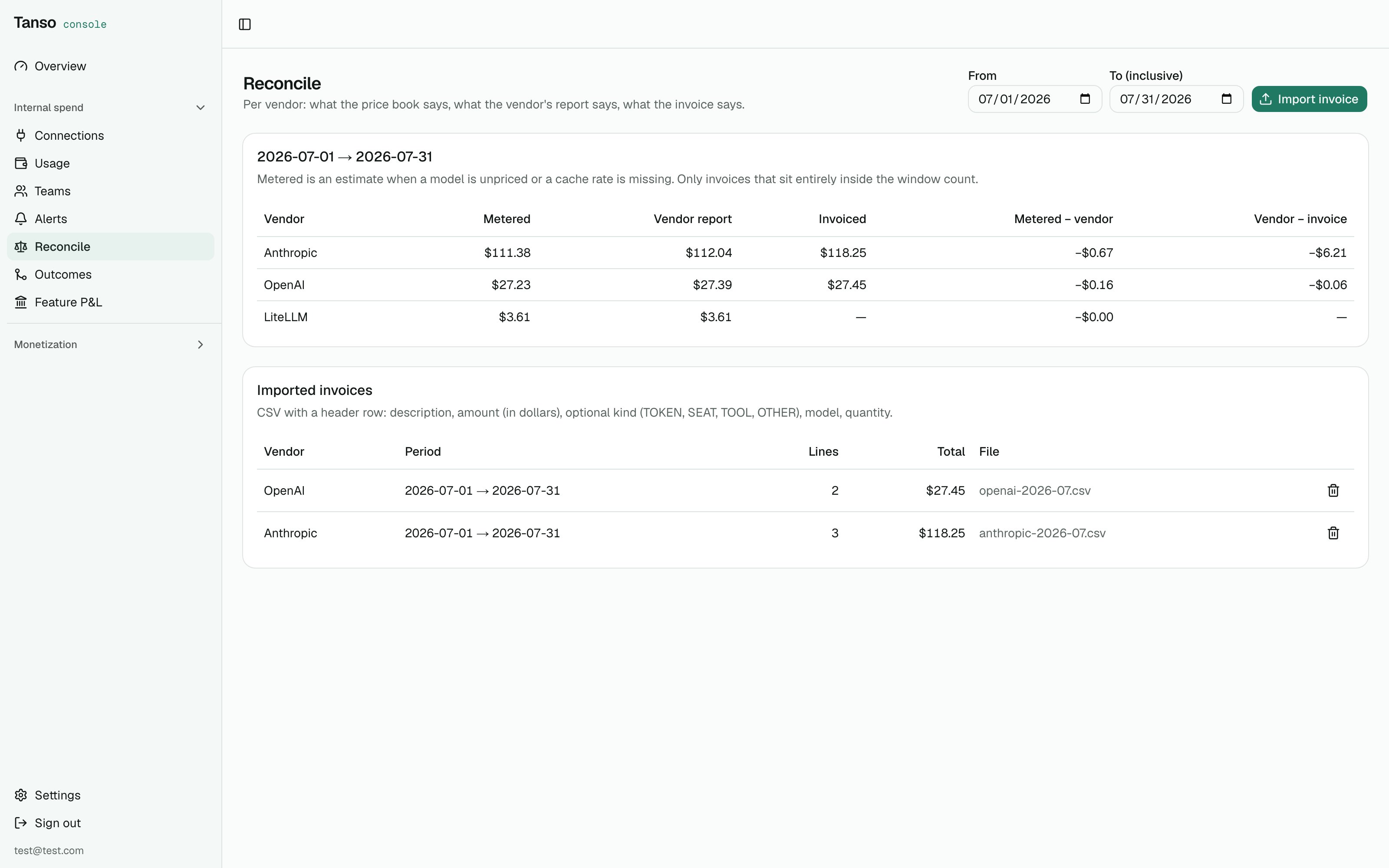
description, amount (in
dollars), and optionally kind (TOKEN, SEAT, TOOL, OTHER), model,
quantity. Seat lines count toward “invoiced” but never appear in a token
cost report, so “vendor − invoice” carries the seats. An invoice only counts
toward a window it sits entirely inside; a straddling one is not pro-rated.
4. Teams, people and rules
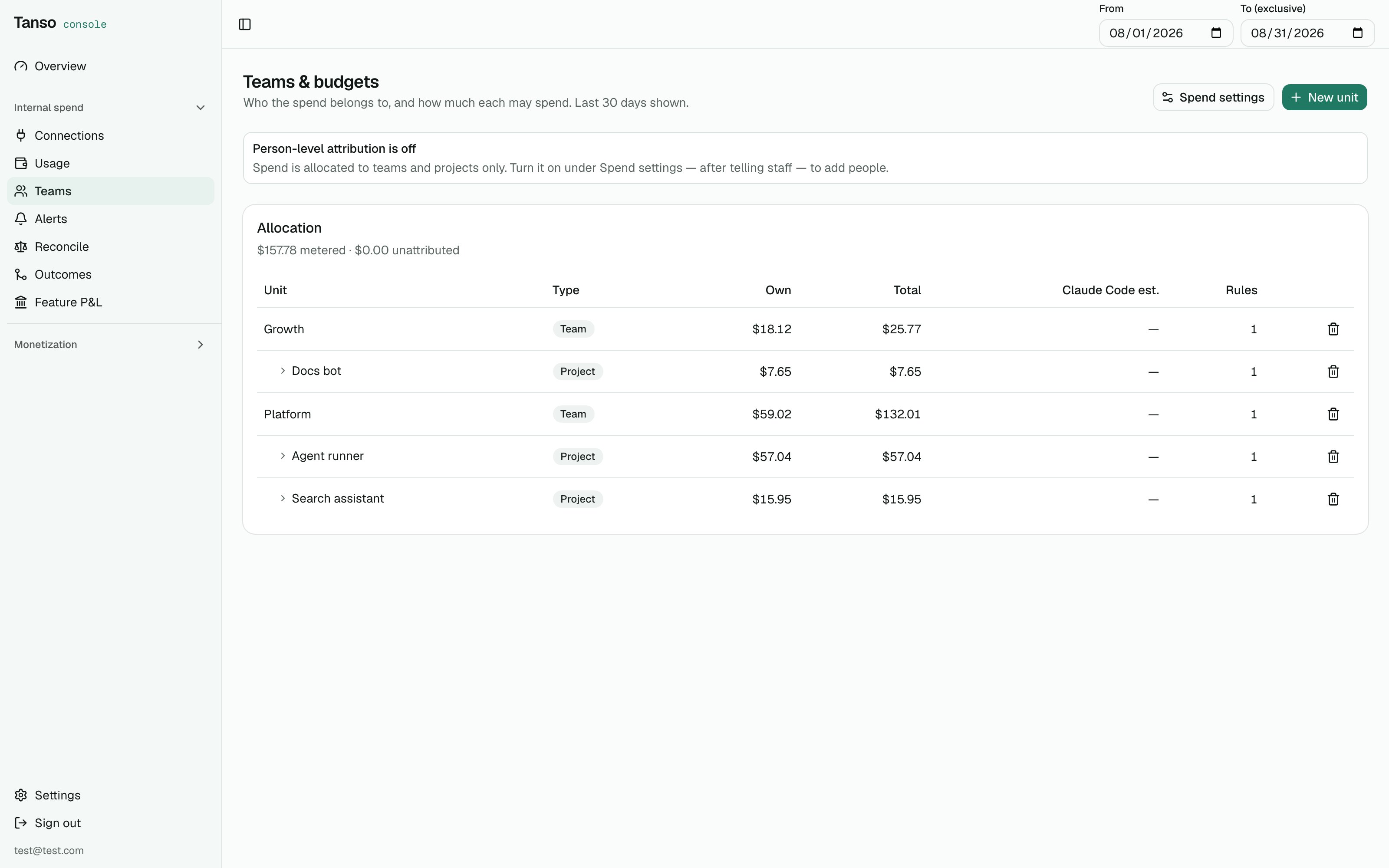
Internal spend → Teams: allocation rolls up the tree; a person's Claude Code estimate stays beside it
Rules apply at report time, never materialised — edit one and history
re-allocates. When several rules match one row, the lowest
priority number
wins. Whatever no rule claims shows as Unattributed, and always sums with
the rows back to the metered total.
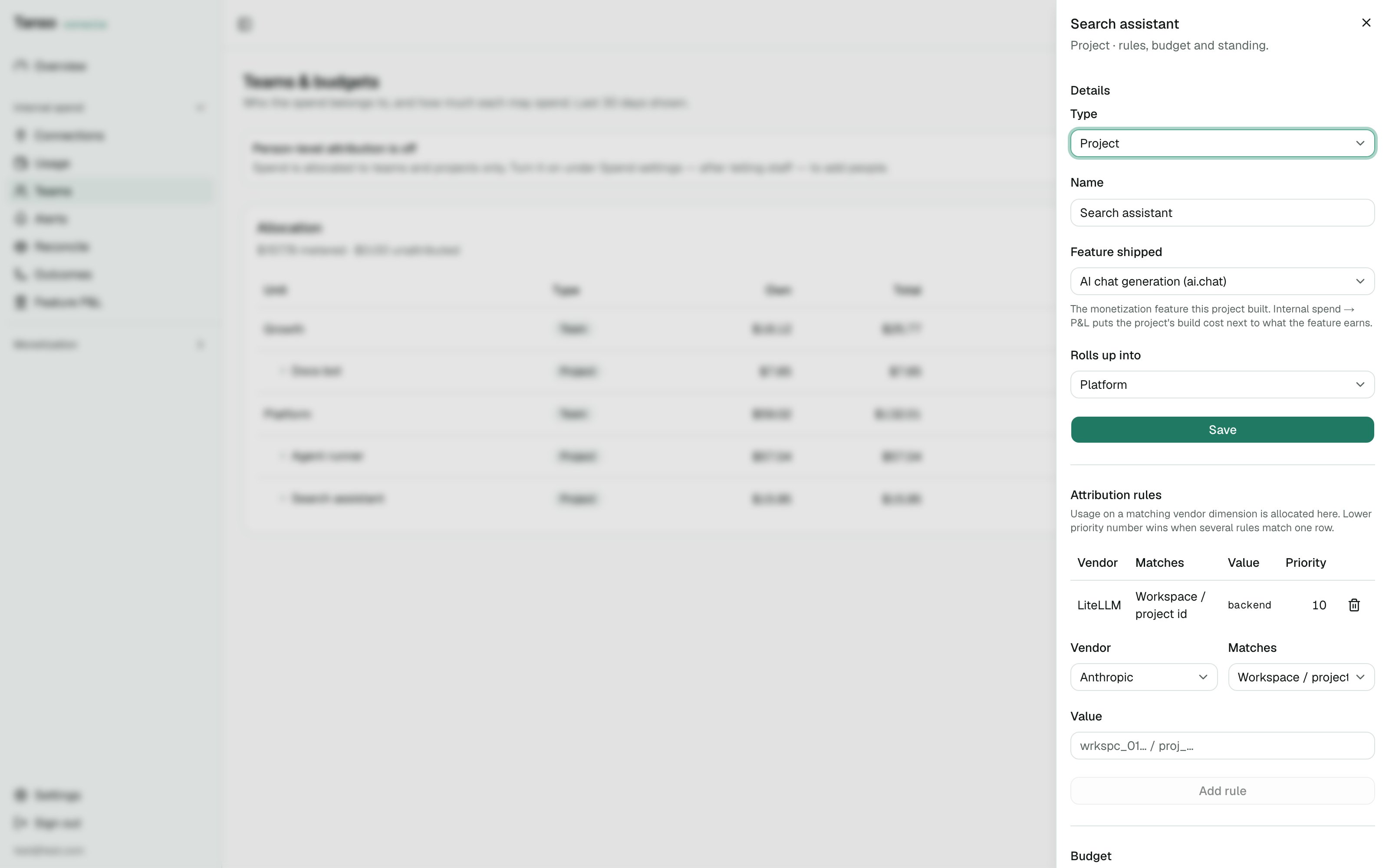
A unit's sheet: attribution rules and the two-clock budget with its standing
Person-level attribution is off by default
Attributing spend to a named employee is a monitoring capability — in Germany a works council can veto it. The switch under Spend settings stays off until you have written the worker notice: what staff were told. While it is off, people cannot be created, person rules are skipped, and the by-person view stays empty. A person’s Claude Code estimate is shown on the person and not rolled up into the team: the same traffic already reaches the team through its key rules.5. Budgets and alerts
Each unit can carry two ceilings on UTC calendar windows:- a daily ceiling, small, to catch a runaway agent within the day;
- a monthly ceiling, the real number.
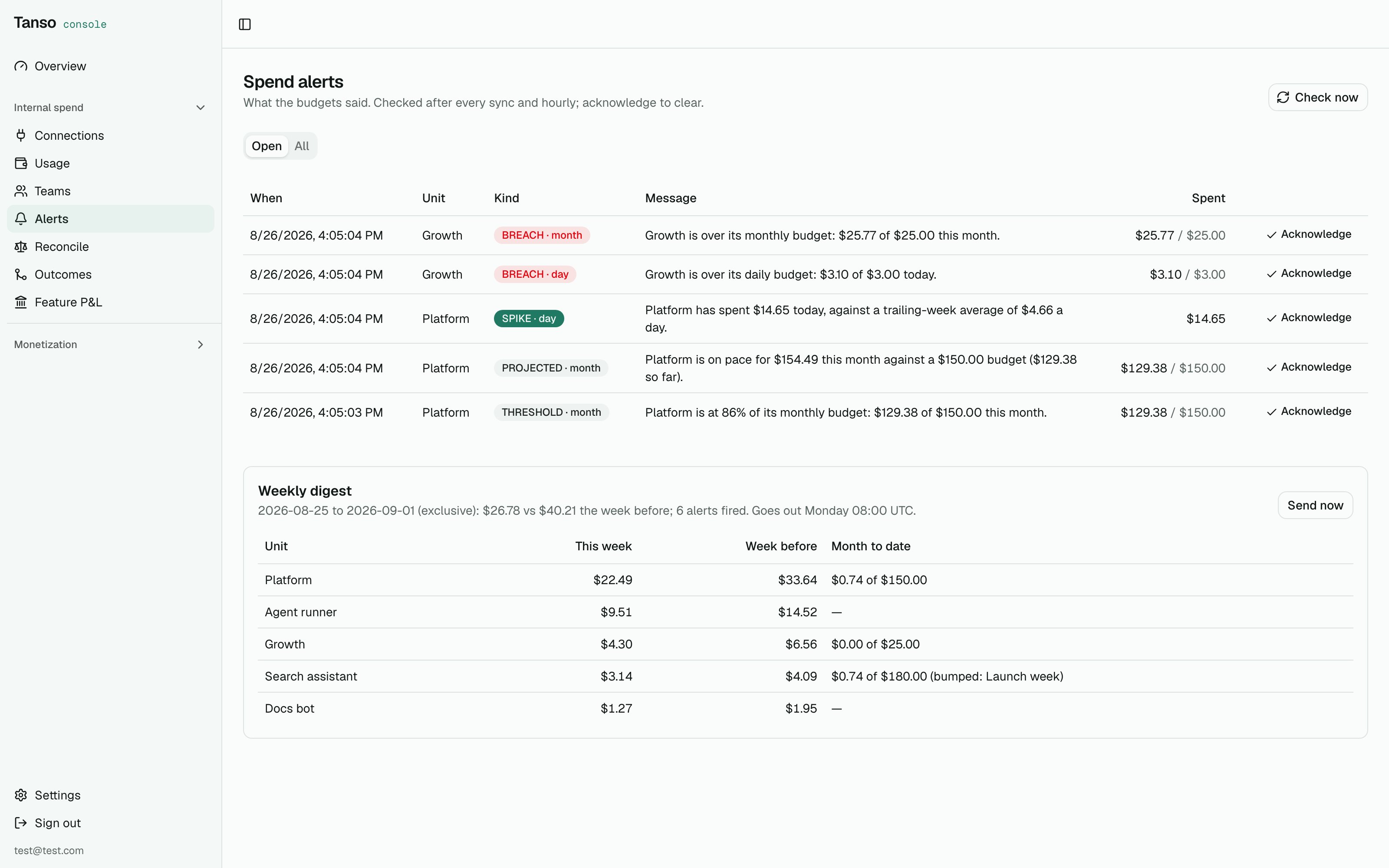
Tanso is not in your request path, so on its own a budget cannot stop a
request. A budget set to Block only alerts — its message says so — unless
a gateway is connected (below). Without one, enforce at your gateway by hand
(Portkey and Bifrost also take per-key budgets) or revoke the key.
Where alerts go
Under Internal spend → Teams → Settings:
Each channel fails on its own and is logged; an alert is recorded before any
of them is tried, so a dead endpoint never loses it.
Payload shape:
{"type":"spend.alert","accountId":"…","alert":{…the alert as GET /alerts returns it…}} or {"type":"spend.digest","accountId":"…", "digest":{…as GET /digest…}}. POST /digest/send answers with a delivery
block — slack / webhook / email each SENT, FAILED or
NOT_CONFIGURED — and the console toast says the same, so a dead email leg
is never reported as sent. The Slack field only accepts hooks.slack.com
URLs; anything else goes in the webhook field.
Verify a signature in Node:
Projected overspend
Once a month, when at least a fifth of the month has passed and the unit is still under its ceiling, Tanso projects month-to-date spend straight-line (spent × month length / elapsed) and fires Projected if that lands above
the ceiling — “Backend is on pace for 200 budget.”
One heavy day early in the month would project to anything, hence the wait.
The pace is spent × (seconds in month ÷ seconds elapsed) at the moment of
the check.
Temporary bump
A launch week should not mean editing the real budget. On the unit’s budget card, Temporary bump takes an amount above the standing ceiling, an end date and a reason. Until then the bump is the ceiling — for alerts, for the digest and for the gateway push; after, the standing number is back and, for a Block budget, re-pushed to LiteLLM. End now drops it early.Weekly digest
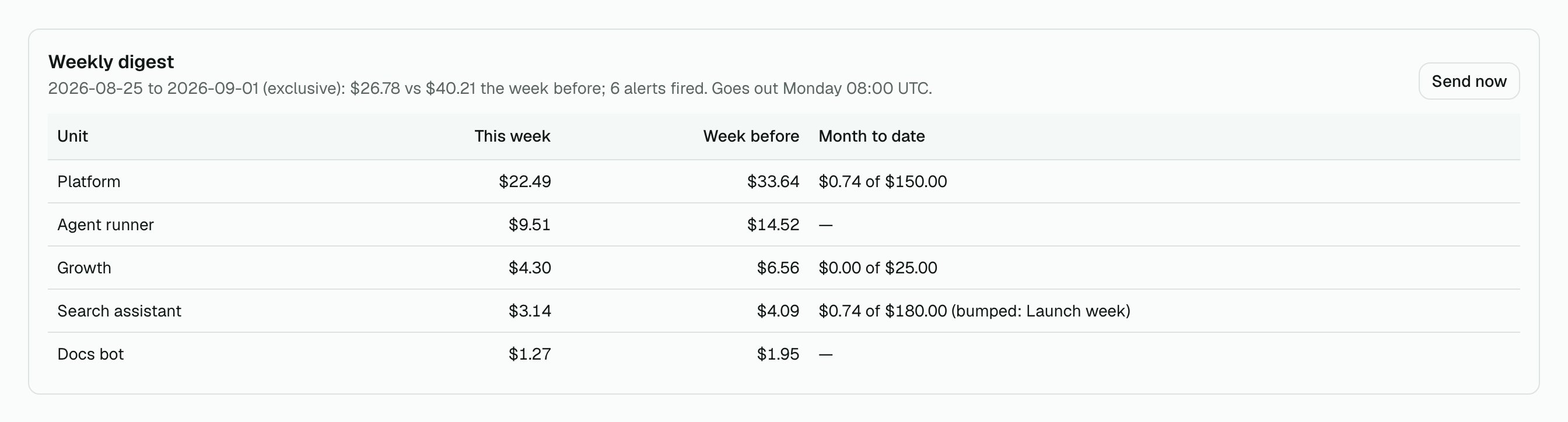
Internal spend → Alerts: the weekly digest, previewed before it goes out
Gateway mode: enforce at LiteLLM
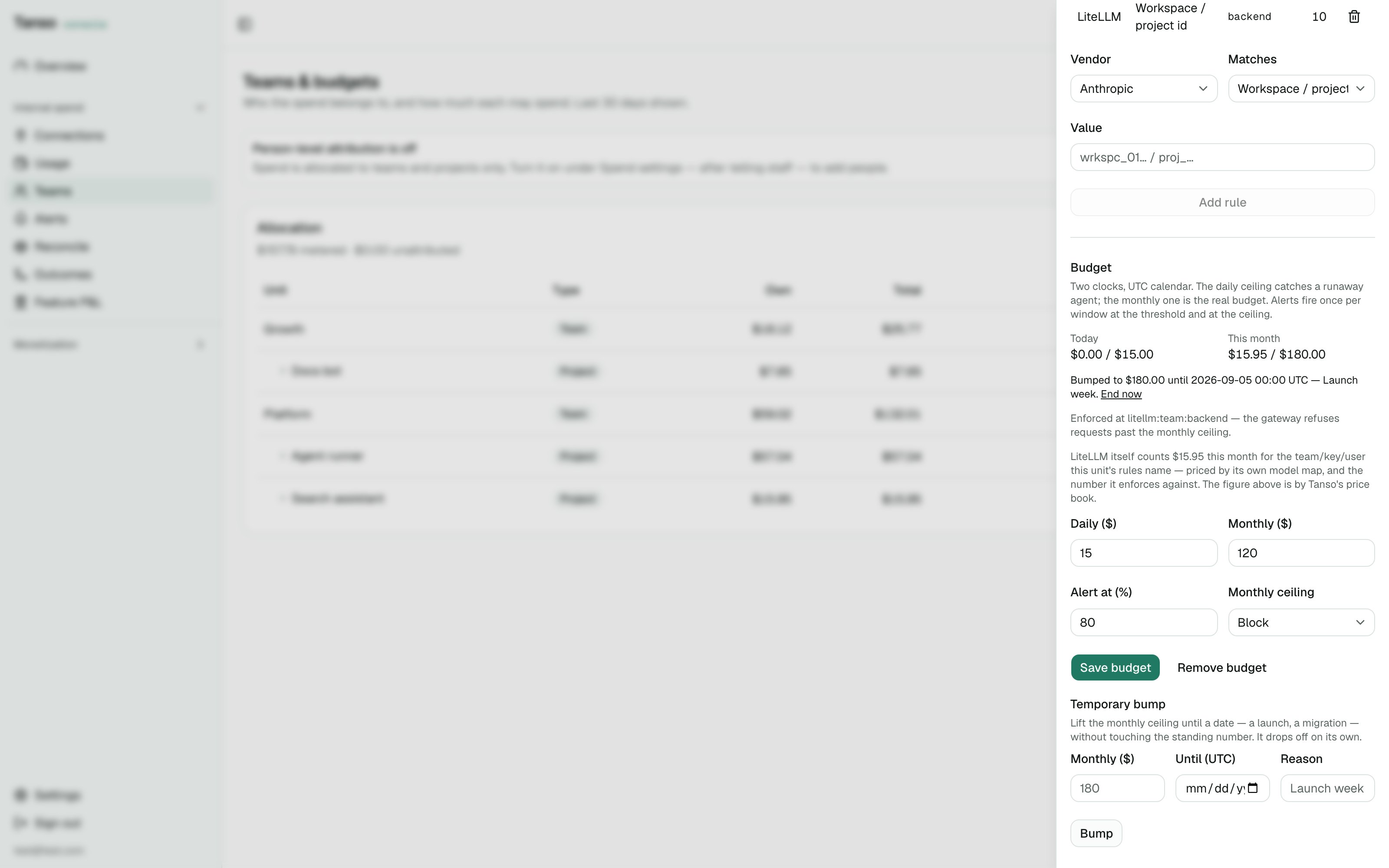
A Block budget enforced at LiteLLM, bumped for launch week — both clocks shown
- Internal spend → Connections → Connect vendor, provider LiteLLM: the proxy URL
and its master key. Check key calls
/health/liveliness; Sync now pulls/spend/logs. - On the unit, add a rule with provider LiteLLM: Workspace = the LiteLLM
team_id, API key = the key, or Actor = the internaluser_id. - Set the monthly ceiling and mode Block, save.
/team/update, /key/update or /user/update with
max_budget (the ceiling in dollars) and budget_duration: "1mo". LiteLLM
refuses requests once its own spend on that object passes the ceiling and
resets it monthly. The budget card shows Enforced at litellm:team:backend
and the breach alert says the same; if the push failed it shows Not
enforced: with LiteLLM’s error, and the budget still saves. Switching the
mode back to Alert — or deleting the budget — pushes max_budget: null so no
stale limit stays behind.
Only the monthly ceiling is pushed; LiteLLM keeps one duration per object, so
the daily ceiling stays an alert. A bump pushes the bumped ceiling and its
expiry pushes the standing one back; a push that fails still saves the budget
and shows Not enforced with the proxy’s error.
6. Outcomes: cost per shipped thing
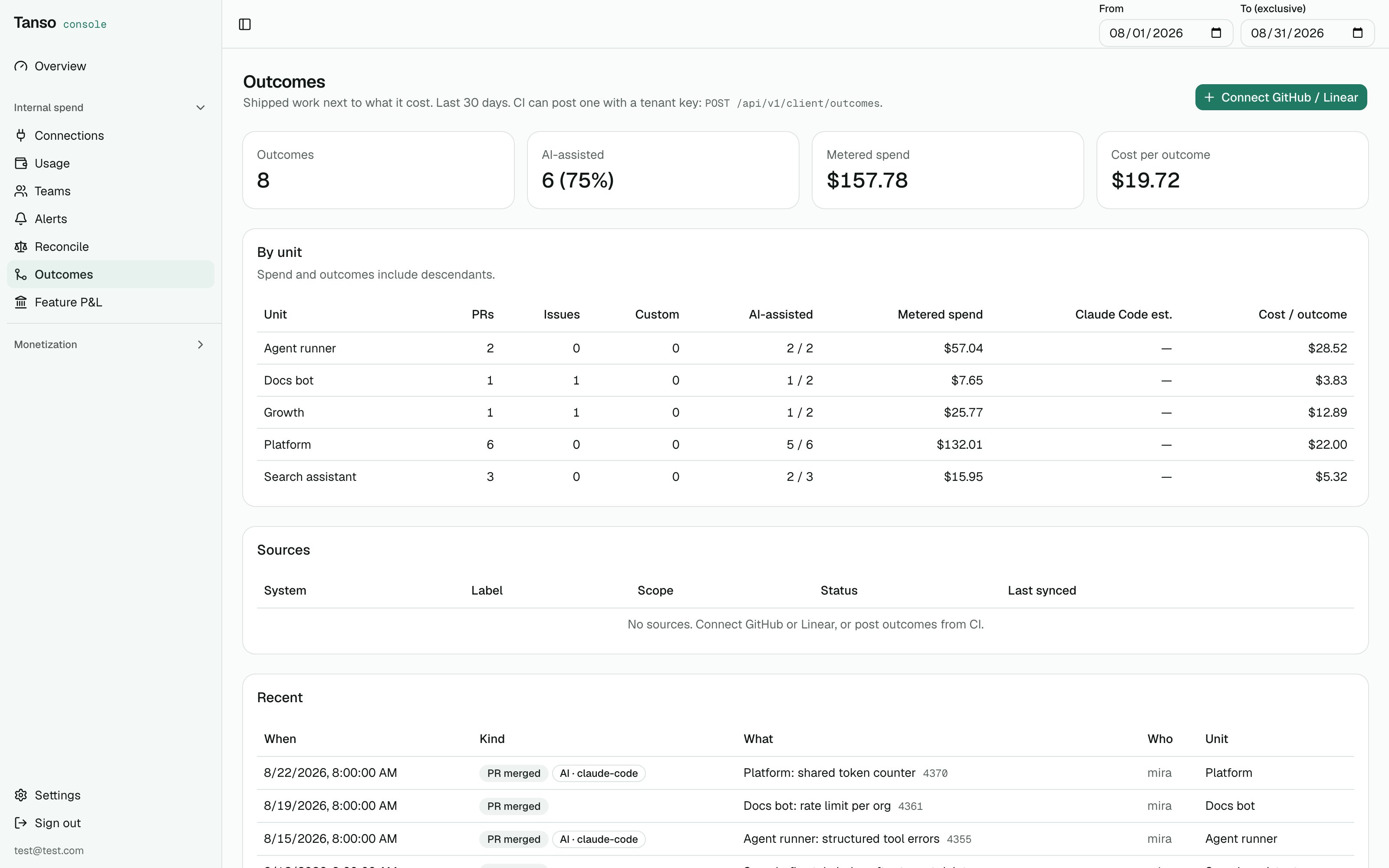
Internal spend → Outcomes: merged PRs and done issues over allocated spend
owner/repo list such as
acme/app, acme/site) or Linear (an API key; scope is comma-separated team
keys such as BE, FE, or * for every team). The token is checked when you
connect, so a bad one shows ERROR immediately. Sync pulls merged PRs /
completed issues for the window and re-pulls upsert; an hourly job covers the
last three days. Disconnecting a source removes the outcomes it pulled;
posted ones stay. A person’s GitHub login goes on their PERSON unit under
Teams so merged PRs attribute to them.
Posted. Any CI job or script can record one with the tenant API key —
the same sk_ key that ingests events. Customer ck_ keys are refused:
this is your spend, not a customer’s.
kind (PR_MERGED, ISSUE_DONE, CUSTOM) and externalId are
required; title, url, actorEmail, actorLogin, spendUnitId and
occurredAt (default now) are optional. Posting the same externalId again
updates only the fields you send. The console route
POST /api/v1/spend/outcomes takes the same body with a JWT.
Attribution. An outcome lands on the person whose email or GitHub login
matches (person level on), else on the source’s default unit, else on the
unit you passed. Outcomes with no unit are counted and called out.
AI-assisted. A merged pull request is tagged AI-assisted, with the tool,
when GitHub already says so: a claude-code-assisted, copilot or cursor
label, a Co-authored-by: Claude / Made-with: Cursor trailer in the body,
or a bot author. Posted outcomes can say so with aiAssisted and aiTool.
Absence is not evidence — an untagged PR is unknown, not human. The report
counts AI-assisted outcomes per unit.
Report. Per unit, metered spend (with descendants) over outcomes (with
descendants): cost per merged PR, per team, per window. A person’s Claude
Code estimate is shown beside the metered figure, never inside it, so every
row divides the same kind of number. Cost per outcome is empty when a unit
shipped nothing or has no metered spend to divide. Recent lists the last
200 outcomes regardless of window.
7. Savings: what caching is worth, what a route would cost
Internal spend → Usage → Savings. Per model, the input side of the bill as it was billed — uncached tokens at the input rate, cache reads and writes at theirs — against the same tokens with no cache. The difference is what prompt caching saved; it goes negative on a model that wrote more to the cache than it read back. Cache-read share is reads over all input tokens. A model with no cache rates in the price book is priced at its input rate for cached tokens, so its saving reads as zero and the row says no cache rates — addcache_read_cost_per_million / cache_write_cost_per_million under
model pricing.
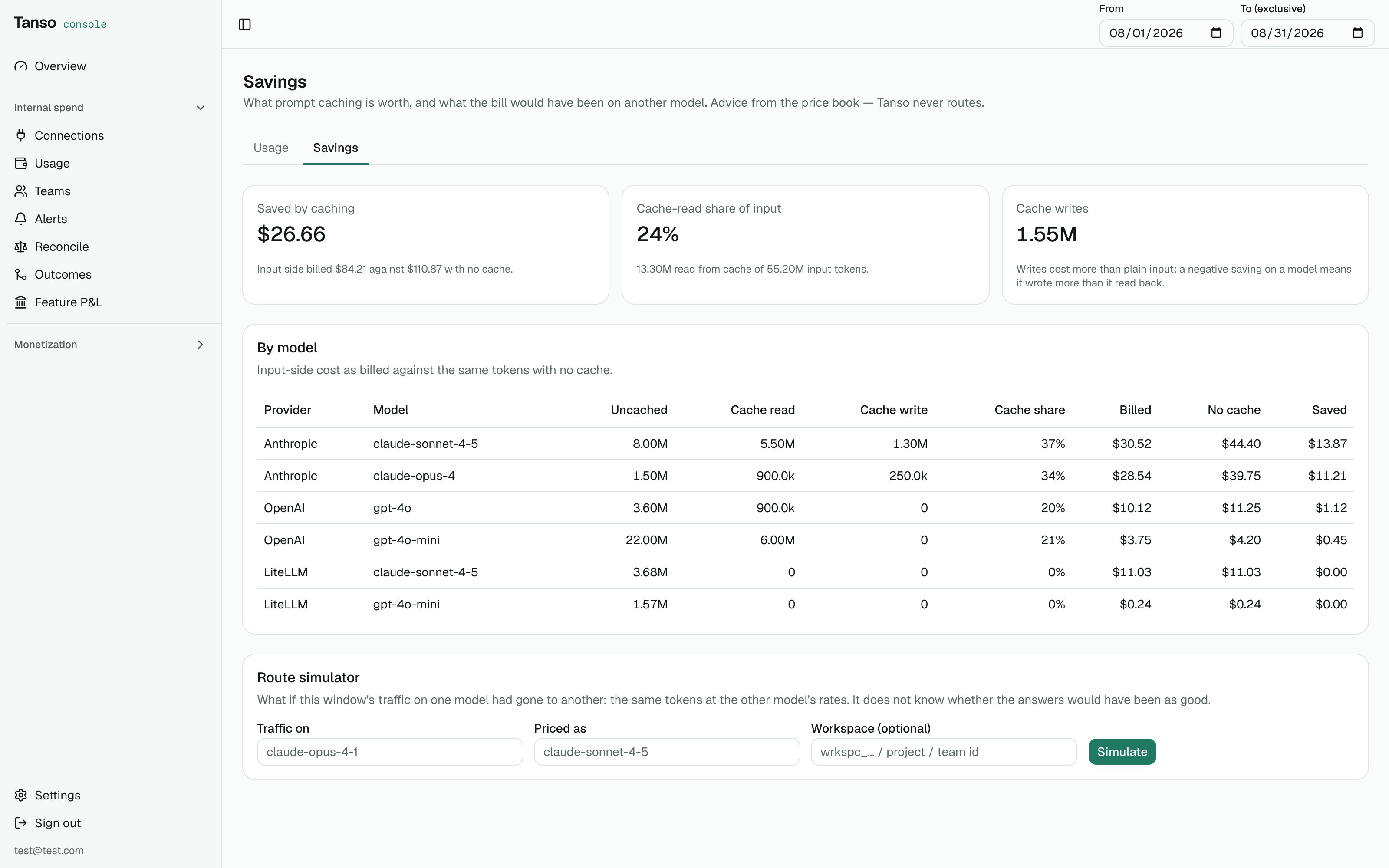
Internal spend → Usage → Savings: what caching saved, and the same tokens priced on another model
Route simulator
“What if the traffic on claude-opus-4-1 had gone to claude-sonnet-4-5?” Pick the model whose traffic to re-price, a target from the price book, and optionally one vendor workspace / project / team id. Tanso sums the matched tokens and prices them at both models’ rates:currentCents, simulatedCents, deltaCents and a list
of caveats that is never empty: token counts are carried over as-is (a
different tokenizer would change them), quality and latency are not
modelled, and it says when the target has no cache rates or a model was
matched fuzzily. It is advice from the price book. Tanso does not route
requests and will not — that was decided before internal spend was started.
8. Feature P&L: what it cost to build next to what it earns
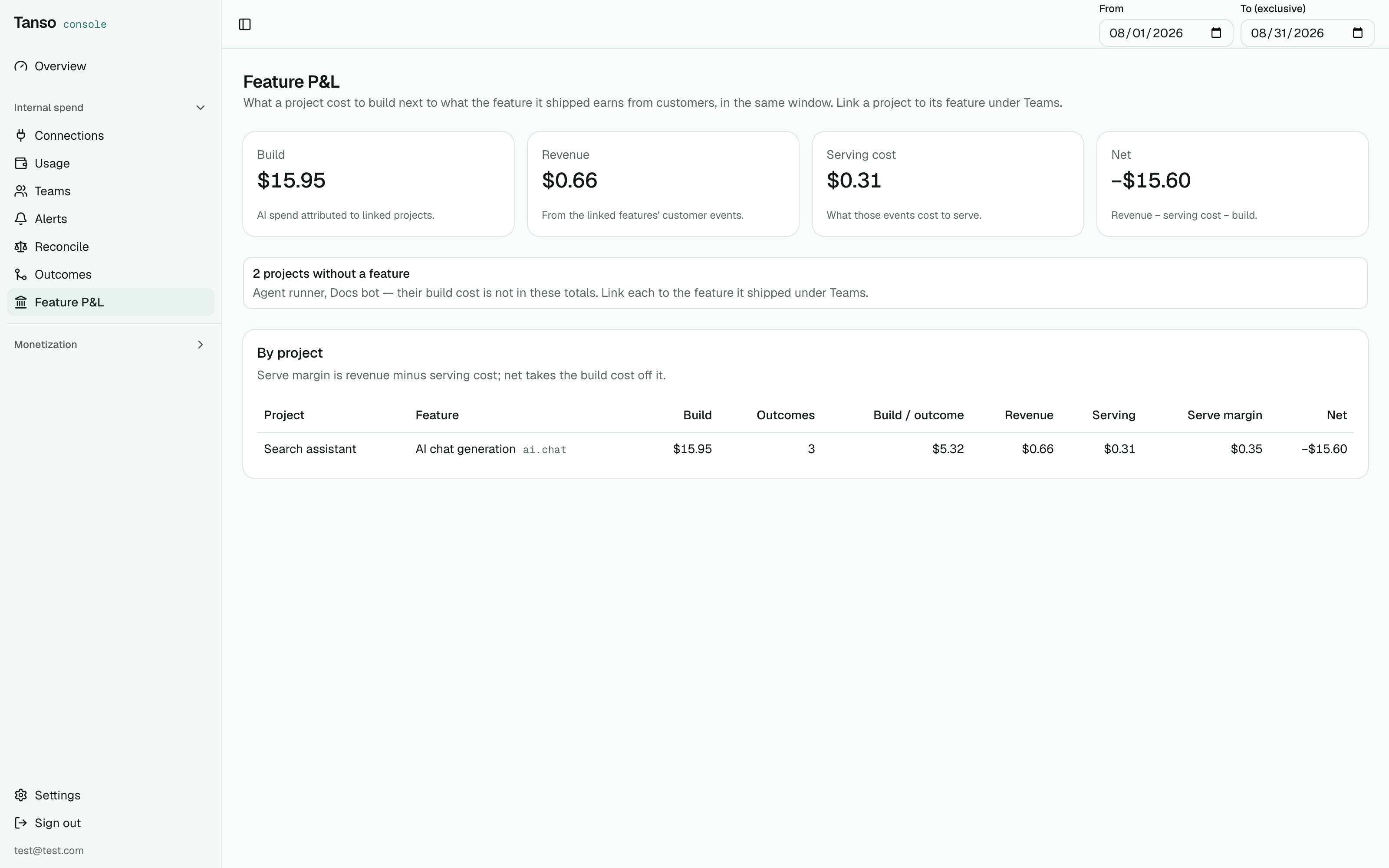
Internal spend → Feature P&L: build cost next to what the feature earns
- Internal spend → Teams, open (or create) a project unit and pick the feature it shipped under Feature — the same features monetization prices in plans.
- Internal spend → Feature P&L (
GET /api/v1/spend/reports/pnl?from&to): per project, its attributed AI spend with descendants (build), what it shipped (outcomes), and from the feature’s customer events in the same window: revenue, serving cost, serve margin, and net = serve margin − build. Build cost per outcome is there too.
revenueAmount /
costAmount on CLIENT_TRACKED and ENTITLEMENT_CHECKED events, so a
feature that is entitled but never metered reads as zero revenue, not as
missing.
Outbound URLs
Two things the operator types are URLs the server will call: the LiteLLM proxy and the generic webhook. Both are checked when saved:http(s) only,
no credentials in the URL, the host must resolve, and loopback, link-local
(where cloud metadata services live) and unspecified addresses are refused.
Private ranges are allowed by default — a self-hosted proxy is exactly what
sits there; on a multi-tenant install set APP_SPEND_OUTBOUND_ALLOW_PRIVATE=false.
Errors from the proxy are surfaced as its JSON error.message / detail
only, never a raw response body.
Settings and operations
Jobs (
application.yaml → jobs:): vendorUsageSync hourly at :15,
spendBudget at :30, outcomeSync at :45. All ShedLock-guarded.
Limitations
- Blocking is advisory unless a LiteLLM connection and rule exist; daily ceilings are never pushed.
- Email needs a Resend key on the server; there is no SMTP path.
- P&L revenue is event revenue, not invoiced revenue — flat plan fees that are not attributed to a feature do not appear on it.
- OpenAI’s
group_byparameter format was verified against OpenAI’s cookbook, not a live admin key — check per-model rows against your dashboard once. - Employee self-view and a manager cohort minimum are not built; person-level data is visible to every console user once enabled.
- Jira is not pulled; post outcomes from CI in the meantime.
- Cursor’s admin API is Enterprise-only; Teams plans cannot connect it.